
Info area PIKO SmartProgrammer and PIKO SmartTester
Uncomplicated operation via the free software for Windows PC and as an app for iOS and Android devices. You have an Internet connection, Windows 10/11 and a free USB port, or a Smartphone, iPhone or Tablet? Then you can get started right away and program or control a whole lot via the attractively designed user interface! Simple and intuitive: programming, setting, testing- Easy uploading of own sounds to suitable decoders
- Configuration of all digital parameters via the intuitive app
- Direct feedback via decoder settings
- Interfaces for decoders of nominal sizes N, TT, H0 and for large track widths
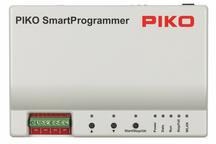
With the PIKO SmartProgrammer, you can download the complete PIKO locomotive projects (including sound), insert your own station announcements and your personal decoder settings easily and conveniently, without any programming knowledge. To do this, you need a PC with Internet access and a free USB port, or a smartphone, iPhone or tablet (WLAN or USB cable).
A lot can be programmed or controlled with the attractively designed user interface!
- Adjust digital parameters of your decoders via intuitive app
- Easy operation without programming knowledge
- Standardmodus: Alle grundlegenden Decodereinstellungen können einfach geändert werden
- Expert mode: More detailed settings of all decoder properties and sound options
- Fast update of the connected PIKO SmartDecoder
- Automatic firmware updates via the App
- Graphic display of the settings made on the locomotive in the app and in conjunction with the PIKO SmartTester
- Fast transmission of sound data via the SUSI interface
- Function key assignment can be changed very easily
- Integrated signal box for switching e.g. turnout decoders
- All data printable
PIKO SmartTester
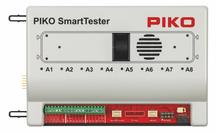
The PIKO SmartTester, for easy testing of your decoders, offers you interfaces of the nominal sizes N, TT and H0, connection possibilities of decoders with large track widths, a long-life motor, a SUSI interface, a high-quality loudspeaker and LEDs. With the PIKO SmartProgrammer as well as the PIKO SmartTester, complete PIKO locomotive projects, which are characterized by loving details and a great deal of expertise in all aspects of railways, can now be easily downloaded and edited.
The PIKO SmartTester only works in combination with the PIKO SmartProgrammer.
- Simple and fast testing of locomotive functions and decoder settings
- Optimally adapted to the PIKO SmartProgrammer
- Direct feedback via speakers, a motor, the LEDs (outputs A1 to A8) and the front/rear peak lights
- Connection to PIKO SmartProgrammer via side plug-in connection
1) Manual
- PIKO SmartProgrammer / PIKO SmartTester quick manual
(Stand 11/2019 .pdf Datei | ca. 1 MB)
2) Software / Updates / App
- Click on the respective app store to download the latest PIKO SmartProgrammer app for your device.
(Stand 03/2026) ► Release Notes
 |  |  |
3) FAQ / Help
08.12.2023 PIKO SmartProgrammer App - the automatic update of version 1.2.10.0 fails
Problem: If the Windows device used has an Internet connection, the PSP app will automatically update the product database and attempt to update to version 1.2.10.0. This process ends with the message "An error occurred while updating the product database. Please check .....".
Reason: A version lower than 1.2.9.0 is installed on the Windows device used. This means that the new features of the TrainBus cannot be processed in the product database of version 1.2.10.0 and therefore the update cannot be carried out.
Solution: Install the new version 1.2.10.0 via the download on this page. (Section 2 Software / Updates / App)
17.05.2023 PIKO SmartProgrammer – Problems with importing or uploading projects with PSD 4.1 & XP 5.1
Under certain circumstances, difficulties can occur when reading in PSDs or error messages when installing projects. These can usually be solved using the small tools in the PIKO SmartProgrammer app. Follow the help instructions in the document, which is available for download as a pdf here.
What should be considered when installing the app on Windows PCs?
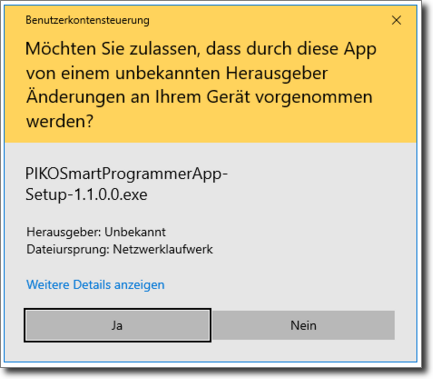
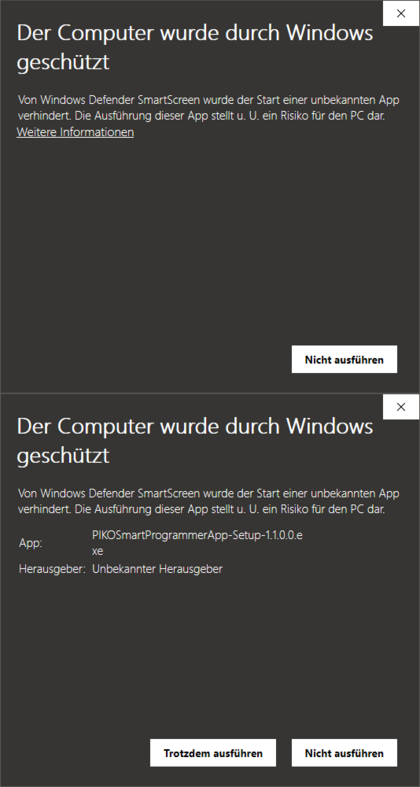
Bzw. wenn Sie die nachfolgende Meldung erhalten, klicken Sie bitte auf "Weitere Informationen" und dann "Trotzdem ausführen"
Programming a 4.1 G Scale decoder in the vehicle does not work??
Manual (PDF)